How to Create a Paid Discord Server
Turn your Discord community into a revenue stream. This guide covers everything from choosing a monetization method to accepting your first payment.
Last updated: February 6, 2026
What This Guide Covers
- Why monetize your Discord server?
- Monetization methods compared
- Step-by-step setup (5 minutes)
- How to price your membership
- Tips for converting free members
- Frequently asked questions
Setup time: 5 minutes with PayBot
Why Create a Paid Discord Server?
You've built something valuable. Your Discord community has active members, quality discussions, and real expertise. But you're doing all the work for free.
A paid Discord server lets you:
- Generate recurring revenue Monthly subscriptions create predictable income from your community
- Increase member quality Paying members are more engaged, less likely to spam, and value the community more
- Fund better content Revenue lets you invest more time in the community—better resources, more events, faster responses
- Filter serious members Even a small fee filters out lurkers and bad actors
Monetization Methods Compared
There are several ways to create a paid Discord server. Here's how they compare:
Discord Payment Bot
A bot that handles subscriptions, payments, and role assignments directly in Discord. Learn more about payment bots →
Pros
- Members subscribe without leaving Discord
- Automatic role assignment
- Setup in minutes, no website needed
- 0% platform fees (with PayBot)
Cons
- Requires a bot in your server
- Members need Discord accounts (obvious)
External Platforms
Services like Patreon, Whop, or LaunchPass that handle payments externally.
Pros
- Brand recognition (Patreon)
- Built-in discovery (Whop)
- Multiple platform support
Cons
- 3-10% platform fees
- They own your customers
- Members leave Discord to pay
- Complex setup
Manual Process
Accept payments via PayPal/Venmo and manually assign roles.
Pros
- No tools required
- 100% control
- No monthly fees
Cons
- Doesn't scale (imagine 100 members)
- No automatic renewals
- No automatic role removal
- Payment disputes are messy
Platform Fee Comparison
On $1,000/month revenue, here's what you'd pay in platform fees:
All platforms also charge Stripe/payment processing fees (~2.9% + 30¢).
How to Set Up a Paid Discord Server
This guide uses PayBot because it's the fastest setup with zero platform fees. You'll be accepting payments in under 5 minutes.
Add PayBot to Your Server
Click the button below to add PayBot to your Discord server. You'll need to be the server owner or have "Manage Server" permissions.
Connect Your Stripe Account
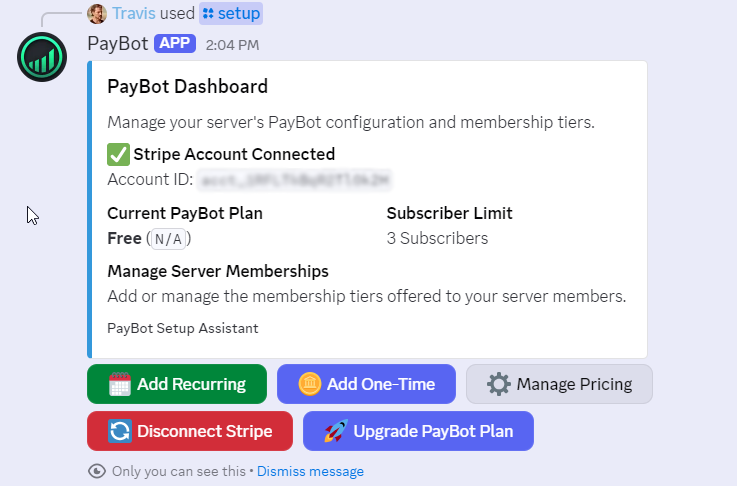
In your Discord server, type /setup. PayBot will guide you through connecting your Stripe account using secure OAuth—no API keys to copy.
Create a Membership Tier
After connecting Stripe, click "Add Recurring" to create your first membership tier:
- Name: What members see (e.g., "Pro Member", "VIP Access")
- Price: Monthly or yearly amount
- Role: The Discord role members receive when they pay
Set Up Your Paid Channels
Create channels that only paid members can see:
- Create a new channel or category
- Edit channel permissions
- Deny @everyone "View Channel"
- Allow your paid role "View Channel"
Share Your Payment Link
You have two ways to accept payments:
That's it. You're ready to accept payments.
When someone subscribes, PayBot automatically assigns their role. When they cancel or their payment fails, PayBot removes the role. No manual work required.
How to Price Your Discord Membership
Pricing depends on the value you provide and who your audience is. Here are common price points by community type:
$5-15/month
- Fan communities (YouTubers, streamers)
- Hobby groups (gaming, music, art)
- General interest communities
Lower price = higher volume. Works when you have a large audience.
$29-99/month
- Trading/investing signals
- Business/marketing groups
- Fitness/coaching communities
- Course companion communities
Most common range. Members expect real value and engagement.
$199-999/month
- High-ticket coaching groups
- Mastermind communities
- Professional networks
- Enterprise-level access
High price = high expectations. Requires significant ongoing value.
$200-2,000 one-time
- Course community access
- Lifetime membership deals
- Cohort-based programs
One-time payments work for defined programs. PayBot supports these on Large plan.
Pricing Tips
- Start higher than you think. It's easier to offer discounts than raise prices later.
- Offer annual discounts. 2 months free for yearly subscriptions improves retention and cash flow.
- Create tiers. Basic ($19/mo) → Pro ($49/mo) → VIP ($99/mo) lets members self-select.
- Test with your audience. Ask them what they'd pay. Their answer is usually honest.
Converting Free Members to Paid
Already have a free community? Here's how to introduce paid memberships without alienating your existing members.
Don't gate everything
Keep your free community valuable. The paid tier should offer more, not replace what's free. Think of it as VIP access, not a paywall.
Show, don't tell
Give free members glimpses of paid content. Post screenshots, summaries, or "here's what Pro members got this week." Let them see what they're missing.
Launch with a discount
Offer founding member pricing to your existing community. "First 50 members get 50% off forever" creates urgency and rewards loyalty.
Announce clearly
Don't sneak it in. Make an announcement, explain what's included, and give people time to decide. Transparency builds trust.
Start with one tier
Don't overcomplicate it. Launch with a single paid tier, see what works, then expand. You can always add more options later.
Deliver immediately
The moment someone pays, they should feel the value. Welcome them personally, give them access to something special, make them glad they subscribed.
Frequently Asked Questions
How much does it cost to create a paid Discord server?
With PayBot, there's no platform fee—you only pay Stripe's processing fee (2.9% + 30¢ per transaction). Other platforms charge 3-10% on top of processing fees. PayBot has a free tier for up to 3 subscribers, then plans starting at $9/month.
Do I need a website?
No. PayBot works entirely within Discord. Members can subscribe using the /subscription command without ever leaving Discord. You can also share payment links on social media or create a Link in Bio page—no external website required.
What happens when someone cancels?
PayBot automatically removes their paid role when the subscription ends. They keep access until the end of their billing period, then lose access to paid channels. No manual work needed.
Can I offer free trials?
Yes. Stripe supports free trials, which you can configure when creating your subscription tier. Members enter payment info upfront but aren't charged until the trial ends.
What if a payment fails?
Stripe automatically retries failed payments based on your settings. If the subscription ultimately fails, PayBot removes the member's role. You can configure Stripe's retry schedule in your Stripe dashboard.
Can I have multiple membership tiers?
Yes. Create as many tiers as you need—different prices, different roles, different access levels. Members can upgrade or downgrade between tiers, and Stripe handles proration automatically.
Do I own my customer data?
With PayBot, yes. Payments go through your Stripe account—you own the customer relationships, payment history, and can export everything. With platforms like Patreon or Whop, they own your customer data.
What about taxes?
You're responsible for your own tax obligations. Stripe provides reporting tools and can collect sales tax if needed. Consult an accountant for your specific situation.
Ready to Create Your Paid Discord Server?
Join servers already using PayBot. Free tier available—no credit card required.