Onboarding DMs
Send personalized welcome messages when someone subscribes. Different content for each tier — course links, server guides, onboarding steps, and more.
Table of Contents
What are Onboarding DMs?
When someone subscribes to one of your membership tiers, PayBot sends them a welcome DM. By default, this is a generic "subscription activated" message. Onboarding DMs let you customize that message per tier with your own content.
Use cases:
- Send course access links to education tier subscribers
- Share server navigation guides for new community members
- Include onboarding checklists or getting-started steps
- Link to external resources, Google Forms, or intake surveys
- Provide different welcome content for different price points
Default vs Custom
If you don't configure onboarding DMs for a tier, subscribers get the standard welcome message with their subscription details. Your existing tiers work exactly as before — this is fully opt-in.
Setting Up Onboarding DMs
- Run
/setupin your Discord server - Select the pricing option you want to customize
- Choose "Setup Onboarding DM" from the action dropdown
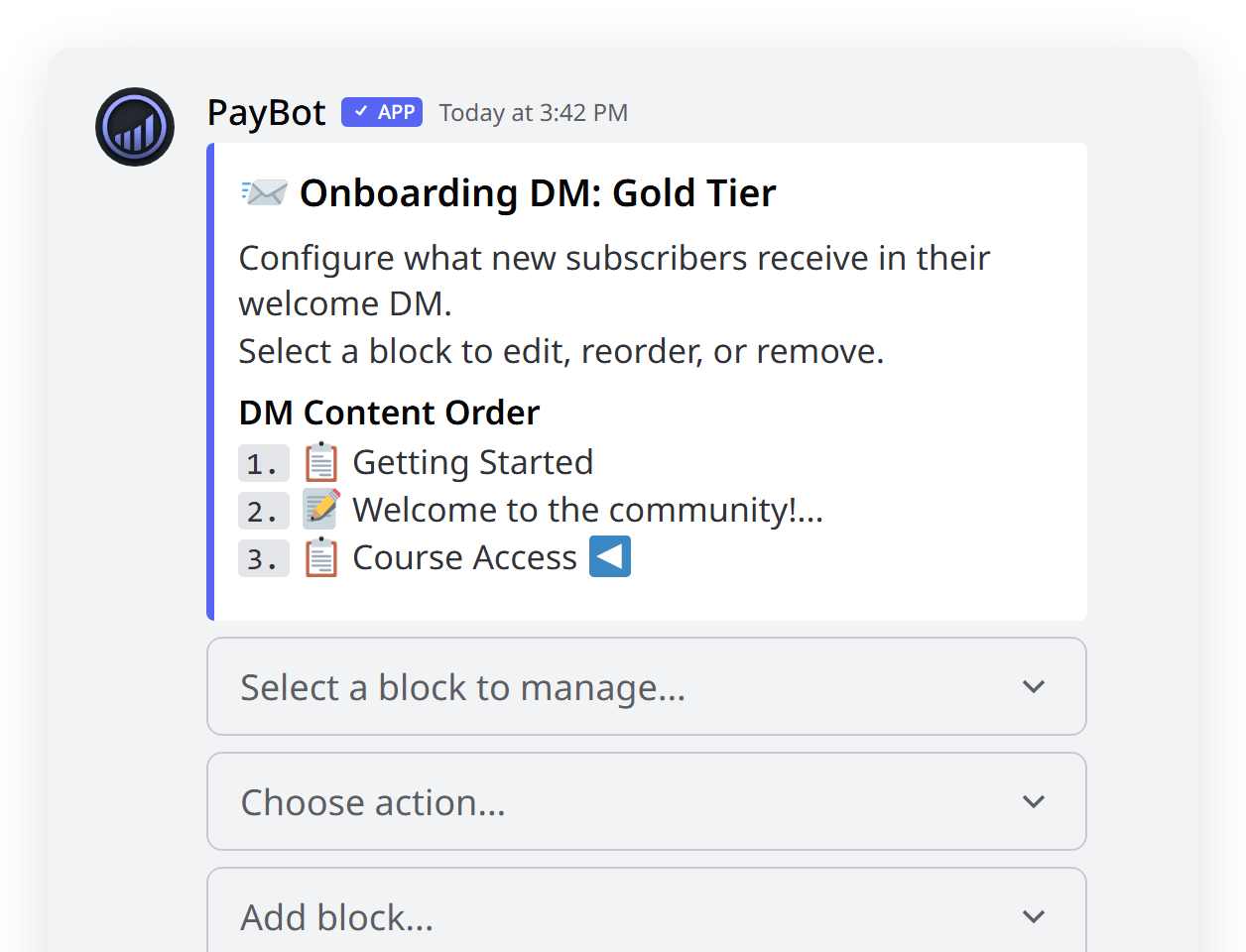
- Add content blocks (sections and text) using the interface
- Use "Send Test DM" to preview the message
That's it. The next time someone subscribes to that tier, they'll receive your custom welcome DM instead of the generic one.
Block Types
Onboarding DMs are built with two types of content blocks:
Section Blocks
Structured content with a title, details, and an optional link. These appear as titled fields in the DM embed.
- Title — The section heading (e.g., "Course Access", "Getting Started")
- Details — The section content (supports multiple lines)
- URL (optional) — A clickable "Open Link" appears below the details
Best for: Links with context, step-by-step instructions, resource lists.
Text Blocks
Free-form paragraphs without a title. These appear as body text in the DM embed.
- Content — Any text you want (supports multiple lines and basic markdown)
Best for: Welcome messages, personal notes, general instructions.
Managing Blocks
The onboarding DM editor works like a list you can reorder:
- Add blocks — Choose "Add Section" or "Add Text" from the dropdown
- Edit blocks — Select a block, then choose "Edit" to update its content
- Reorder blocks — Select a block, then use "Move Up" or "Move Down"
- Delete blocks — Select a block, then choose "Delete"
Blocks appear in the DM in the order you arrange them.
Testing Your DM
Click "Send Test DM" to send yourself a preview of the onboarding DM. This sends the exact embed a subscriber would receive, so you can verify:
- Content looks correct
- Links work and point to the right places
- Block order makes sense
- Nothing is cut off or missing
Tip: Check the test DM on mobile too — most Discord users read DMs on their phone.
How It Works
When a subscription is activated (payment confirmed via Stripe), PayBot:
- Checks if the tier has onboarding blocks configured
- If yes — builds a custom embed with your blocks as fields
- If no — sends the standard generic welcome DM
- DM is sent to the subscriber automatically
This happens alongside role assignment — the subscriber gets their role and the custom DM at the same time.
Example Configurations
Online Course Community
Tier: Premium Course Access ($49/month)
- Text block: "Welcome to the Premium Course! Here's everything you need to get started."
- Section: "Course Portal" — "Log in with your Discord email to access all course materials." — Link: course URL
- Section: "Getting Started" — "1. Watch the intro video\n2. Join #introductions\n3. Post your first question in #questions"
- Section: "Weekly Schedule" — "Live sessions every Tuesday at 7pm EST in the Stage channel."
Gaming Community
Tier: VIP Member ($5/month)
- Text block: "You're now a VIP! Here's what you've unlocked."
- Section: "VIP Channels" — "Check out #vip-chat, #vip-lfg, and #vip-clips — they're now visible in your channel list."
- Section: "Server Guide" — "Full list of channels and what they're for." — Link: server guide URL
Professional Community
Tier: Mastermind Group ($200/month)
- Text block: "Welcome to the Mastermind. We're glad to have you."
- Section: "Intake Form" — "Please fill out this short form so we can pair you with the right accountability partner." — Link: Google Form URL
- Section: "First Steps" — "1. Introduce yourself in #mastermind-intros\n2. Book your 1-on-1 onboarding call\n3. Review the resource library"
- Section: "Book Onboarding Call" — "Schedule a 15-minute call with our team." — Link: Calendly URL
FAQ
What happens if I don't set up onboarding DMs?
Nothing changes. Subscribers receive the same generic welcome DM they've always gotten. This feature is fully opt-in per tier.
Can I have different DMs for different tiers?
Yes — that's the whole point. Each tier has its own set of blocks. Your $5/month tier can say one thing, your $50/month tier can say something completely different.
Is there a limit on blocks?
Discord embeds support up to 25 fields. In practice, 3-6 blocks is the sweet spot — enough to be helpful without overwhelming new subscribers.
Can I use markdown in the content?
Yes. Discord supports basic markdown in embed fields: bold, italic, code, and links. Use **bold** for emphasis and \n for line breaks.
What if the subscriber has DMs disabled?
If the subscriber has DMs disabled, PayBot can't send the message. The subscription and role assignment still work normally — they just won't receive the welcome DM. This is the same behavior as before.
Can I edit the DM after people have already subscribed?
Yes. Changes only affect future subscribers. People who already received the old DM won't get a new one — but their subscription and roles are unaffected.