Affiliate Program
Turn your members into promoters — create affiliate codes, set commission rates, and let affiliates track their earnings directly in Discord
Table of Contents
Overview
PayBot's affiliate program lets you recruit members to promote your server's paid tiers. When someone subscribes through an affiliate's link, the affiliate earns a commission on every payment — including renewals.
🔗 Unique Links
Each affiliate gets a unique code appended to your existing payment links
💰 Recurring Commissions
Affiliates earn on every renewal, not just the first payment
📊 Self-Service Dashboard
Affiliates track their referrals and earnings with /affiliate
Requirements
Plan Requirement
The affiliate program requires the Large plan ($89/mo) or higher. You also need a portal page set up with at least one published tier.
Before creating affiliates, make sure you have:
- A connected Stripe account (via
/setup) - At least one membership tier with a payment link
- A portal page (Link in Bio) — affiliate links use your portal URL
Creating Affiliates
Server admins add affiliates through the setup dashboard. Each affiliate is a Discord user in your server.
Open /setup
Run /setup in your server and navigate to Manage Affiliates.
/setup → Manage AffiliatesAdd an Affiliate
Click Add Affiliate and select a Discord user from your server. PayBot generates a unique 6-character affiliate code automatically.
Set Commission Rate
Choose a commission percentage between 1% and 50%. The default is 10%. This rate applies to every payment made through the affiliate's link.
Example: A 10% commission on a $20/mo tier means the affiliate earns $2.00 per subscriber per month — on every renewal.
Share the Affiliate Link
The affiliate's link is your portal URL with their code appended. Share it with the affiliate so they can start promoting.
go.paybotapp.com/myserver/vip-tier?aff=ABC123Stripe Express Account: When you add an affiliate, PayBot creates a Stripe Express account for them. This is how commissions are tracked and paid out through Stripe Connect.
How Affiliate Links Work
Affiliate links are your existing payment links with an ?aff=CODE parameter added. When someone checks out through an affiliate link:
Customer Clicks the Link
The affiliate shares their unique URL. The customer lands on your portal or goes directly to checkout.
Referral is Tracked
PayBot records the affiliate code in the subscription metadata. This link persists for the lifetime of the subscription.
Commission on Every Payment
Each time the subscriber is billed (including renewals), the affiliate's commission is calculated and tracked.
Self-Referral Prevention
Affiliates cannot use their own link to subscribe. PayBot blocks self-referrals to prevent abuse.
Affiliate Dashboard
Affiliates check their stats using the /affiliate command. This is available to any user who has been added as an affiliate.
/affiliate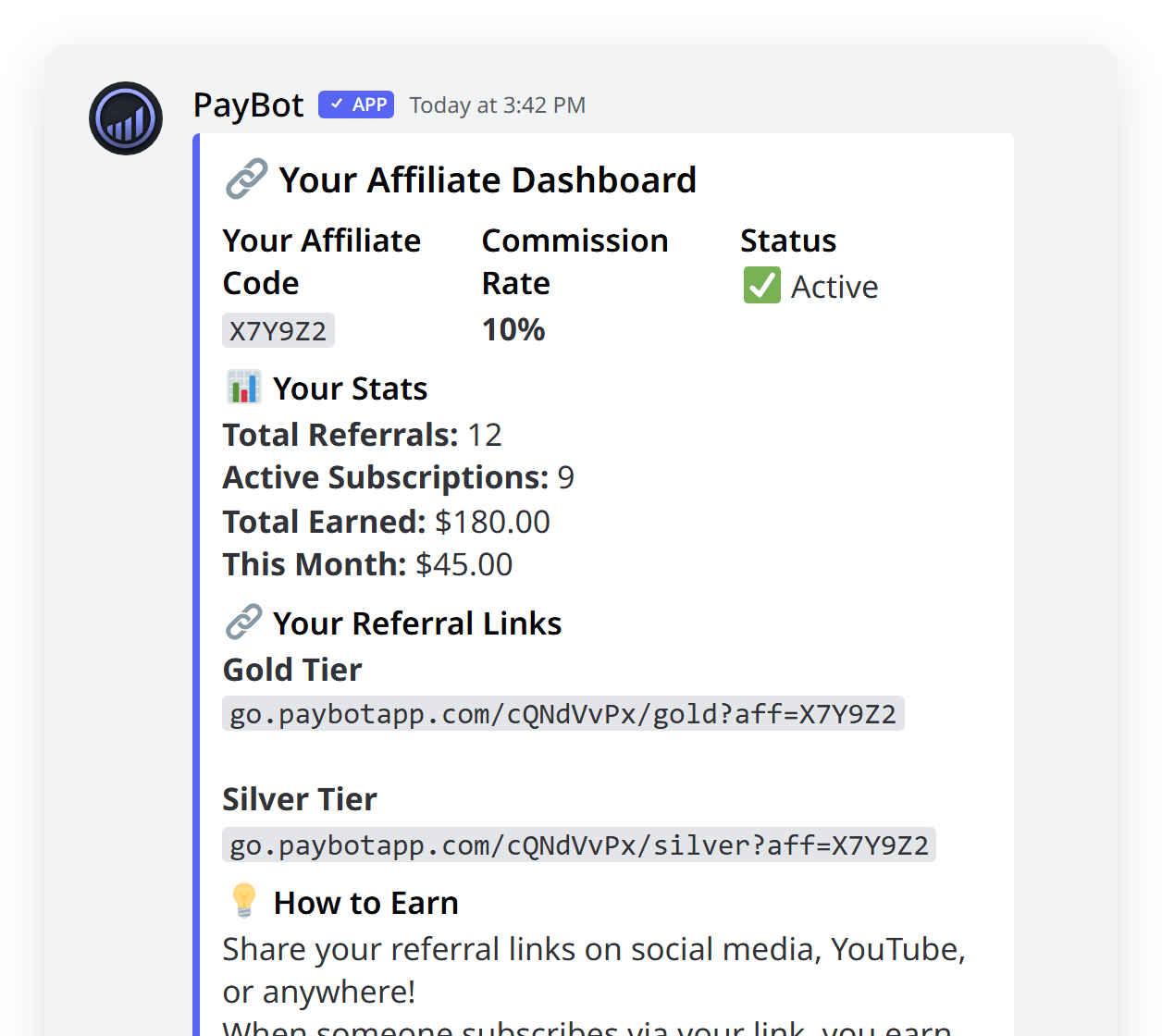
The dashboard shows:
📈 Referral Stats
- Total referrals
- Active subscribers referred
- Your affiliate code
- Your affiliate link
💵 Earnings
- Total earned (all time)
- Pending payout
- Commission rate
- Per-referral breakdown
Privacy: The /affiliate command response is ephemeral — only the affiliate can see their stats.
Commissions & Payouts
How Commissions Work
- Recurring: Affiliates earn on every billing cycle, not just the initial payment
- Percentage-based: Commission is calculated as a percentage of each payment
- Lifetime attribution: Once a subscriber is linked to an affiliate, that link persists — even across renewals
Payout Process
Commissions are managed through Stripe Connect. When an affiliate is created, PayBot sets up a Stripe Express account for them. Payouts are processed through Stripe's standard transfer system.
Commission example:
- Tier price: $20/month
- Commission rate: 15%
- Per-payment commission: $3.00
- If the subscriber stays for 12 months: $36.00 total earned
Managing Affiliates
Admins can manage all aspects of the affiliate program from /setup → Manage Affiliates.
Edit Commission Rate
Change an affiliate's commission percentage at any time. The new rate applies to future payments only — past commissions are not recalculated.
Remove Affiliates
Deactivate an affiliate to stop tracking new referrals through their code. Existing referrals and pending payouts are preserved.
Multiple affiliates: You can have as many affiliates as you need. Each gets their own unique code and commission rate — useful for offering higher rates to top promoters.
FAQ
Can I set different commission rates for different affiliates?
Yes. Each affiliate has their own commission rate (1-50%). You can reward top performers with higher rates.
Do affiliates earn on renewals or just the first payment?
Affiliates earn on every payment — initial and all renewals. The referral link persists for the lifetime of the subscription.
Can an affiliate refer themselves?
No. PayBot prevents self-referrals automatically.
What happens if I change the commission rate?
The new rate applies to future payments only. Past commissions are not recalculated.
Do I need a portal page for affiliates?
Yes. Affiliate links are built on your portal/payment link URLs. You need at least one published tier with a payment link.