Discord Server Monetization Playbook

Turn Your Discord Expertise Into a Paid Offer

Choose what to sell, set a price, publish the offer, and connect each completed payment to the right Discord role.

Build Your First Offer Free to add • Your Stripe
Compare Six Methods

New accounts run on your own Stripe with no monthly fee. PayBot earns only after a member pays.

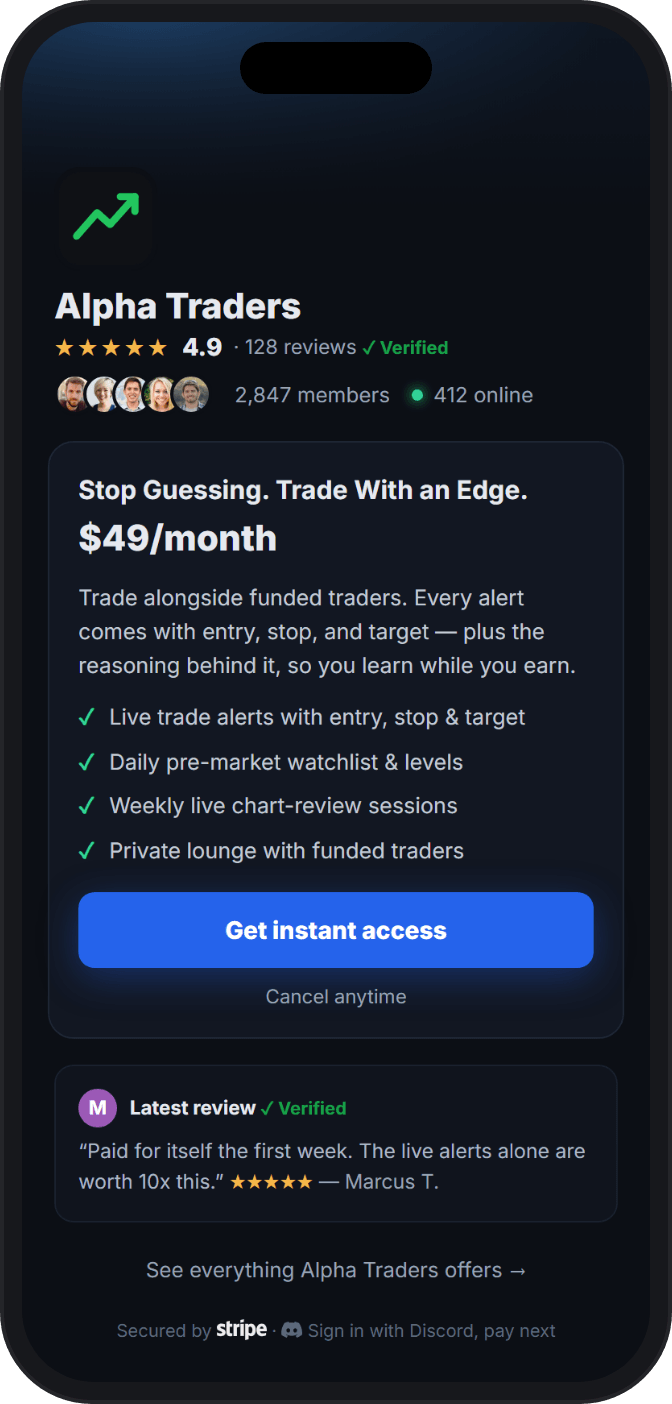
PayBot Commerce payment page with a clear offer, price, benefits, and verified subscriber review
A complete paid offer, checked on mobile before you share it.

Start With Demand

Members Pay for a Result They Can Use

An active Discord can still lack paid-ready demand. Members pay for a result, privileged access, or an ongoing advantage they can name. Start with the value people already return for.

  • Members ask for deeper help, faster access, or a private working group.
  • Your expertise changes a decision, shortens a task, or keeps someone accountable.
  • People already follow your calls, attend your sessions, or use your resources.
  • You can deliver the promised value on a reliable schedule.

If your main task is roles, channels, and permissions, use the paid Discord server build guide.

Six Proven Methods

Choose the Revenue Model That Fits Your Value

The right model follows the way members receive value. Pick the closest fit and build one offer around it.

Recurring Membership

For communities that deliver fresh guidance, access, or support on a steady weekly or monthly rhythm.

Who it fits

Operators who publish, host, review, or support members throughout the month.

What members buy

Continued access to dependable value and the people around it.

Pricing shape Monthly access first, with annual billing after retention is clear.

Tiered Premium Access

For established communities where members want different levels of access, attention, or speed.

Who it fits

Operators with a proven core offer and repeated requests for a higher level of service.

What members buy

A clear step up in access, response time, depth, or direct contact.

Pricing shape Shared billing intervals with a meaningful access change at every tier.

Paid Signals and Resources

For experts whose timely analysis, research, templates, or alerts help members make better decisions.

Who it fits

Trading, research, data, professional, and resource-driven communities.

What members buy

Information they can act on, delivered with a clear scope and schedule.

Pricing shape Recurring when the work continues, or one-time when the resource is complete.

Coaching and Accountability

For coaches who guide a defined result through check-ins, group calls, feedback, and follow-through.

Who it fits

Fitness, business, career, creative, and skill-based operators.

What members buy

Progress with a coach, a cadence, and peers who keep the work moving.

Pricing shape Monthly access for ongoing coaching, or a fixed price for a bounded program.

Guided Courses and Cohorts

For teachers who lead members through a defined curriculum, live cohort, or completion milestone.

Who it fits

Educators with a start point, a finish line, and a body of material to teach.

What members buy

A guided path through the material, plus access to help and peers.

Pricing shape One-time for a defined course, or recurring when new instruction continues.

One-Time or Lifetime Access

For a bounded program, resource library, or permanent community entry sold through one payment.

Who it fits

Operators selling a finished body of work or a long-lived private network.

What members buy

Lasting access without another billing date.

Pricing shape One payment tied to a clearly stated scope and access term.

Referrals can help a working offer reach more buyers. Add them after members buy, stay, and describe the value in their own words.

Offer Design

Package One Clear Promise Before You Add Tiers

Write these five decisions in one sentence each before you open PayBot.

  1. One Right-Fit Member

    Name the person who already values the result. A narrow fit makes the page easier to trust.

  2. One Useful Outcome

    State what changes for the member. Make it clear enough that both sides know whether the offer delivered.

  3. One Delivery Rhythm

    Choose when the value arrives. Weekly calls, daily signals, monthly reviews, and fixed cohorts set different expectations.

  4. One Defensible Price

    Set a price you can explain through the work and access included. Use the planning ranges below as inputs, not promises.

  5. One Paid Discord Role

    Tie the offer to one role with one obvious access boundary. Members should know what opens after checkout.

Illustrative Starting Points

Plan the Price Against the Work

  • $5 to $20 monthly for supporter or community access.
  • $29 to $99 monthly for professional content, coaching, or signals.
  • $199 to $999 monthly for high-touch access with direct involvement.
  • $99 to $999 one-time for a course, cohort, or permanent access offer.

Plan With Your Own Numbers

Price the Offer Against the Audience You Have

Enter a member count and price to inspect gross sales, estimated Stripe processing, PayBot cost, and a net planning figure.

Monthly sales$1,450
Estimated Stripe processing-$57
PayBot, 3% of sales-$44
Planning figure$1,349
Annualized planning figure$16,193

This calculator multiplies your inputs. It says nothing about demand, retention, refunds, disputes, taxes, or country-specific fees.

The Selling Surface

Put the Offer Where Your Audience Already Trusts You

A serious buyer sees the offer before the private channels. Give them a clear promise, enough proof to judge it, and a payment path that works on a phone.

Choose a Page That Fits

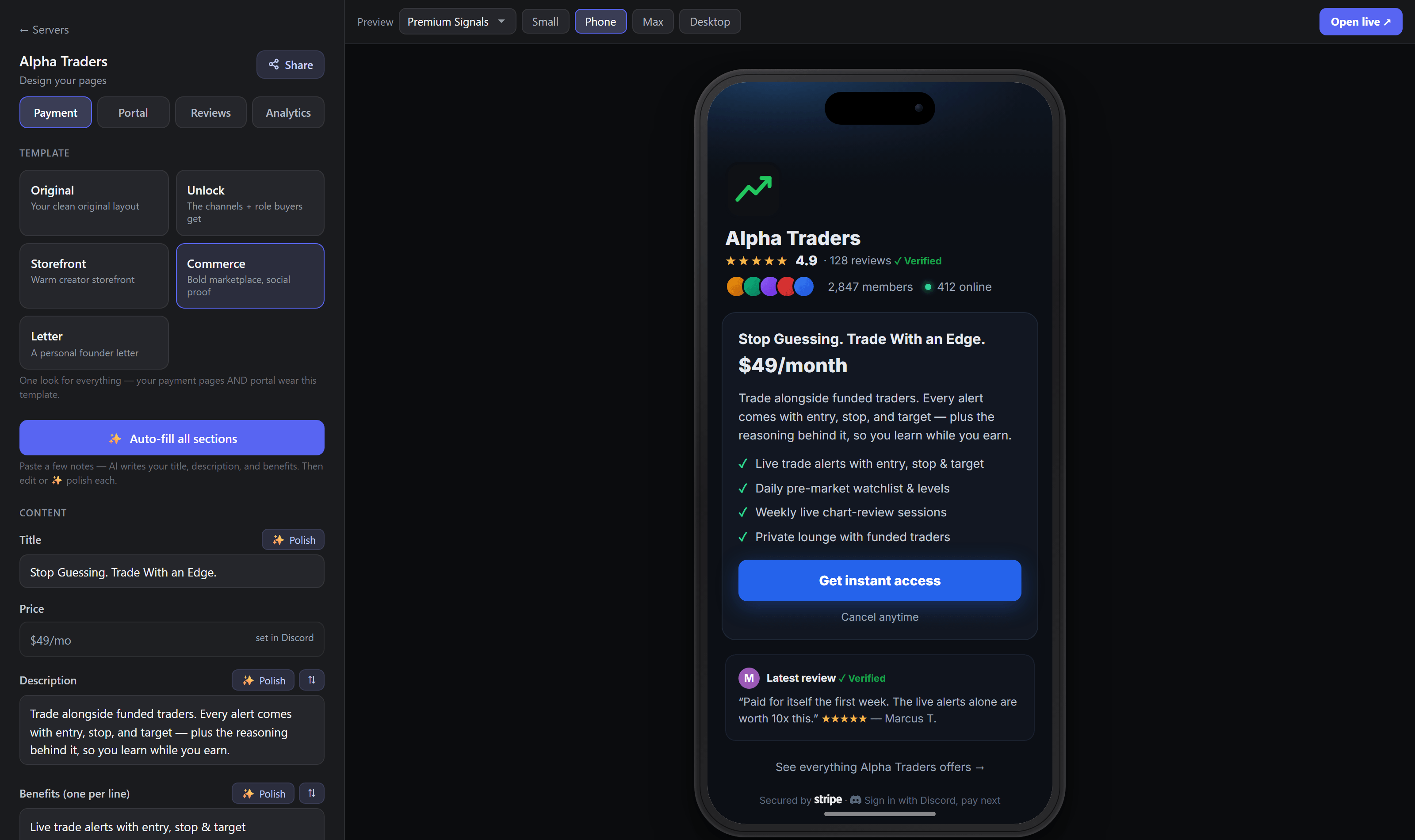
Pick from five Studio page styles and shape each block around the offer your audience is considering.

Preview Every Offer on Mobile

Check the phone view before publishing so the promise, proof, price, and button stay easy to follow.

Give Every Offer One Home

Put multiple memberships in one portal so buyers can compare the choices from one trusted link.

Place Paid Member Proof Nearby

Verified subscriber reviews place feedback from paying members beside the offer they experienced.

See Where Buyers Stop

Funnel analytics show page visits, checkout starts, purchases, and paid members for each offer.

PayBot Studio showing five page styles, editable offer sections, and a live mobile preview
Five page styles, editable offer blocks, and a live phone preview in one Studio.

The Paid Operation

Let Payment and Discord Access Run Together

Members move from the offer page to the right private space while the money lands in your Stripe.

01

Connect Your Existing Stripe

Link the account where customer payments and payout records should live.

02

Create the Offer and Role

Set the product, price, billing schedule, and Discord role from the PayBot setup flow.

03

Share the Finished Page

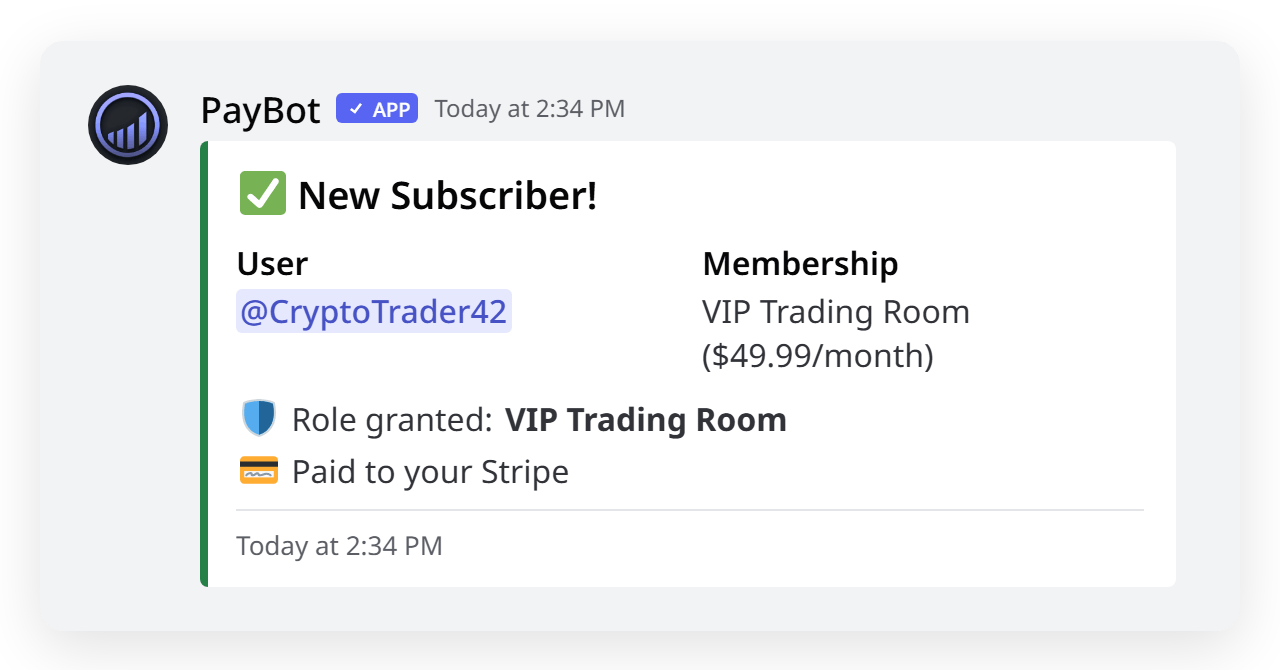
Publish the offer where your audience follows you. A completed checkout grants the linked role.

PayBot Discord notification confirming a completed sale and granted role
  • Completed checkout grants the paid role.
  • Subscription deletion removes the paid role.
  • A failed renewal stays past due while Stripe retries.
  • Refunds and chargebacks require a manual access review.
  • PayBot does not provide Stripe Tax or VAT automation.
Daniel from Active Stacks
"PayBot simplified our entire subscription process. We set it up in minutes and now manage over 200 premium members effortlessly."
Daniel, Active Stacks Community · 210 members

Before You Launch

Questions Serious Discord Operators Ask Before Launch

Can I use my existing Stripe account?

Yes. Connect the Stripe account you already use. Discord sales appear there with your other customer and payout records.

Do I need a website?

You can launch without one. PayBot hosts the offer page and portal, so you can share a finished payment link from Discord, social profiles, email, or your existing site.

What fees are involved?

New accounts have no monthly PayBot fee. PayBot earns about 3% on successful sales. Stripe charges its own processing costs based on your account, country, and payment method.

When will Stripe pay out my sales?

Sales land in your Stripe account. The payout schedule shown in Stripe determines when those funds move to your bank.

Should I keep free channels?

Keep a public layer that proves the quality of your work and helps new members understand the community. Reserve the promised result and delivery rhythm for the paid role.

What happens after a refund or dispute?

Handle the case in Stripe, then review the member's Discord access. Refunds and chargebacks do not automatically remove the PayBot role.

Does PayBot handle sales tax or VAT?

PayBot does not ship Stripe Tax or VAT automation. Set your tax process with a qualified adviser and configure any required collection outside PayBot.

Your First Paid Offer

Start With One Offer and Learn From Paying Members

Choose the clearest value your community already trusts you for. Publish one offer, deliver it well, and let paying members show you what deserves the next tier.

Build Your First OfferFree to add • Your Stripe

Your Stripe. New accounts have no monthly fee. PayBot earns only after a sale.