
Process Discord Payments Without Building Infrastructure
Complete payment processing system for Discord. Handles checkout, billing, subscriptions, and role management automatically.
Trusted by Discord Communities
"PayBot simplified our entire subscription process. We set it up in minutes and now manage over 200 premium members effortlessly."

"The tier grouping feature has increased our revenue by 40%. Members can easily upgrade their subscriptions without any friction."

"Our members love how easy it is to subscribe. The seamless role assignment and checkout process has boosted our conversion rate significantly."

Everything a Payment Processor Should Do
Checkout Processing
- Stripe-hosted checkout pages
- Cards and wallets you enable in Stripe
- Any currency, with optional local-currency pricing
- Promo code support
Subscription Billing
- Daily, weekly, monthly, quarterly, or yearly charges
- Automatic retry on failed payments
- Pro-rated upgrades and downgrades
- Cancellation at period end
Member Management
- Automatic role assignment
- Real-time status tracking
- Member subscription history
- Bulk role updates
Admin Controls
- Create unlimited pricing tiers
- Archive or edit memberships
- View subscriber counts
- Revenue and funnel analytics in the dashboard
How Payment Processing Works
User Initiates Purchase
Member runs /subscription command and selects a tier. PayBot creates a Stripe checkout session on your connected account.
Stripe Handles Payment
User enters card info on Stripe's PCI-compliant checkout page. Stripe processes the charge and handles 3D Secure if needed.
PayBot Detects Completion
Stripe notifies PayBot the moment the checkout completes, and PayBot records the subscription.
Role Assignment
Discord role is added to the member within seconds. They get a DM confirmation with subscription details.
Support for Multiple Payment Models
Recurring Subscriptions
Daily to yearly billing that renews automatically. Perfect for memberships, coaching programs, or premium Discord access.
Includes:
- Automatic renewal
- Failed payment retry logic
- Dunning management
- Cancellation handling
Included free
One-Time Purchases
Single payments for lifetime access. Great for courses, one-time services, or permanent role upgrades.
Includes:
- No recurring charges
- Lifetime role assignment
- Purchase receipts
- Customer support access
Included free
💡 Process Payments from Anywhere
Generate payment links to accept payments on your website, social media, or anywhere else outside Discord.
Learn About Payment Links →Built for Server Admins
Manage It from the Dashboard or Discord
Run products, pages and members from the web dashboard, or do the same jobs with Discord commands.
Create Pricing Tiers
Use Products in the dashboard, or /setup → Create Subscription, to make a new membership level. Set the price, interval, role, and description.
Edit or Archive Tiers
Need to change pricing or pause signups? Edit or archive the product in the dashboard, or use /setup → View & Edit Products.
Group Related Tiers
Link Bronze, Silver, Gold tiers together so members can upgrade without canceling. Pro-rated charges happen automatically.
Track Subscribers
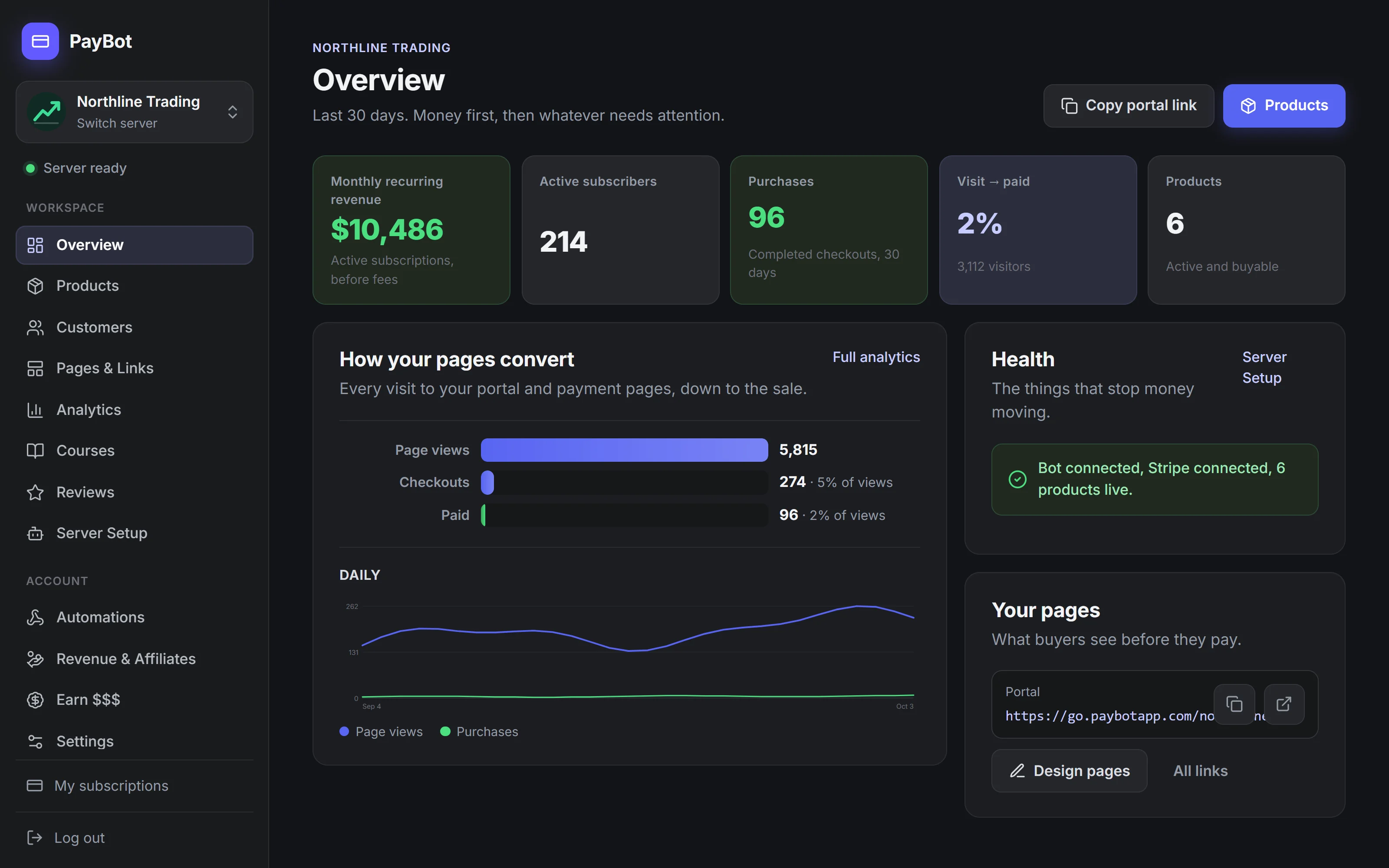
The PayBot dashboard shows MRR, active subscribers, and where buyers drop off. Your Stripe dashboard keeps the full billing record.

Payment Security & Compliance
PCI-DSS Compliant
All payment processing happens on Stripe's infrastructure, which is certified PCI-DSS Level 1 (the highest level of compliance). Card data never touches PayBot's servers or your Discord server.
Your Stripe Account
Payments are processed through your own Stripe account. You maintain full ownership of customer data, and funds are deposited directly to your bank account.
OAuth Authentication
PayBot connects to Stripe using OAuth 2.0. Your Stripe secret keys never leave Stripe's servers, and you can disconnect PayBot anytime from your Stripe dashboard.
Data Encryption
All communication between PayBot, Discord, and Stripe is encrypted in transit. The Discord access tokens PayBot keeps are stored encrypted.
Handling Failed Payments
Payment failures are normal. Cards expire, bank accounts run out of funds, or fraud checks trigger false positives. Here's how PayBot handles them:
1. Stripe Retries Automatically
Stripe's Smart Retries feature attempts to charge the card again at optimal times based on machine learning.
2. Customer Notification
While Stripe retries, PayBot emails and DMs the member to update their payment method, and alerts you that the payment failed.
3. Grace Period, Then Role Removal
The member keeps access for the grace period you set (7 days by default, or none). If the payment hasn't recovered by then, PayBot removes the Discord role automatically.
4. Re-activation Support
If the member updates their payment method in Stripe, they can run /subscription again to reactivate without creating a new subscription.
How PayBot Compares
| Feature | PayBot | Custom Bot | Third-Party Platforms |
|---|---|---|---|
| Setup Time | 5 minutes | 40+ hours | Varies |
| Transaction Fees | Stripe's standard rate + PayBot's share | Stripe's standard rate | Platform cut + processing |
| Your Stripe Account | ✓ | ✓ | Varies by platform |
| Role Automation | ✓ Built-in | Custom code needed | ✓ Usually included |
| Maintenance Required | ✗ None | ✓ Ongoing | ✗ None |
| Pricing Model | Free; 3% only when you sell | Hosting costs | % of revenue |
Processor Pricing
Free to install. Add the bot, connect Stripe, and start selling. You only pay us when your members pay you.
Free to Start
Everything the processor does, free to set up on your own Stripe
- Subscriber management
- One-time purchases
- Payment links
- Tier groups for upgrades
- Affiliate program and import from Stripe
- Advanced analytics
PayBot is free to start. You only pay 3% when your members pay you, on top of Stripe's standard processing rate.
Payment Processing FAQ
What payment methods does the processor support?
Whatever your Stripe account supports. Usually this includes Visa, Mastercard, Amex, Discover, Apple Pay, Google Pay, and various regional methods depending on your location.
What does PayBot cost?
PayBot is free to install, with no monthly fee. You only pay when your members pay you: PayBot keeps a small 3% share of your sales, and Stripe charges its own standard processing fees (about 2.9% + 30¢ per transaction in the US). Nothing is due while you're not selling.
Can I process payments in multiple currencies?
Yes, if your Stripe account supports it. Your customers will be charged in the currency you set when creating each price.
How long does it take for payments to reach my bank?
That depends on your Stripe payout schedule, which you control in your Stripe dashboard. Typically it's 2-7 days after the initial payment.
What happens if Stripe is down?
If Stripe's API is unavailable, users won't be able to complete checkouts until it's back. PayBot will automatically retry failed requests.
Can I export transaction data?
All transaction data lives in your Stripe dashboard. You can export it as CSV or connect Stripe to your accounting software using their integrations.
Start Processing Payments in Your Discord
Free to install. Set up in under 5 minutes. You only pay when your members do.