
Accept Payments Right Inside Your Discord Server
The Discord payment bot that runs on your own Stripe. Stripe runs the checkout, PayBot assigns the role the second the card clears, and the money lands in your Stripe account. Add it, then connect Stripe in the web dashboard or with /setup in Discord.
Trusted by Discord communities everywhere. Free to add. You only pay when your members do.
Trusted by Discord Communities
"PayBot simplified our entire subscription process. We set it up in minutes and now manage over 200 premium members effortlessly."

"The tier grouping feature has increased our revenue by 40%. Members can easily upgrade their subscriptions without any friction."

"Our members love how easy it is to subscribe. The seamless role assignment and checkout process has boosted our conversion rate significantly."

Why Server Owners Choose PayBot
Start Earning Immediately
Add the bot, connect Stripe, and you can accept your first payment in under 5 minutes.
Zero Maintenance
The bot handles everything. Role assignments happen automatically when someone pays.
Your Stripe Account
Money goes straight to your bank account. We never touch your funds.
Built-in Analytics
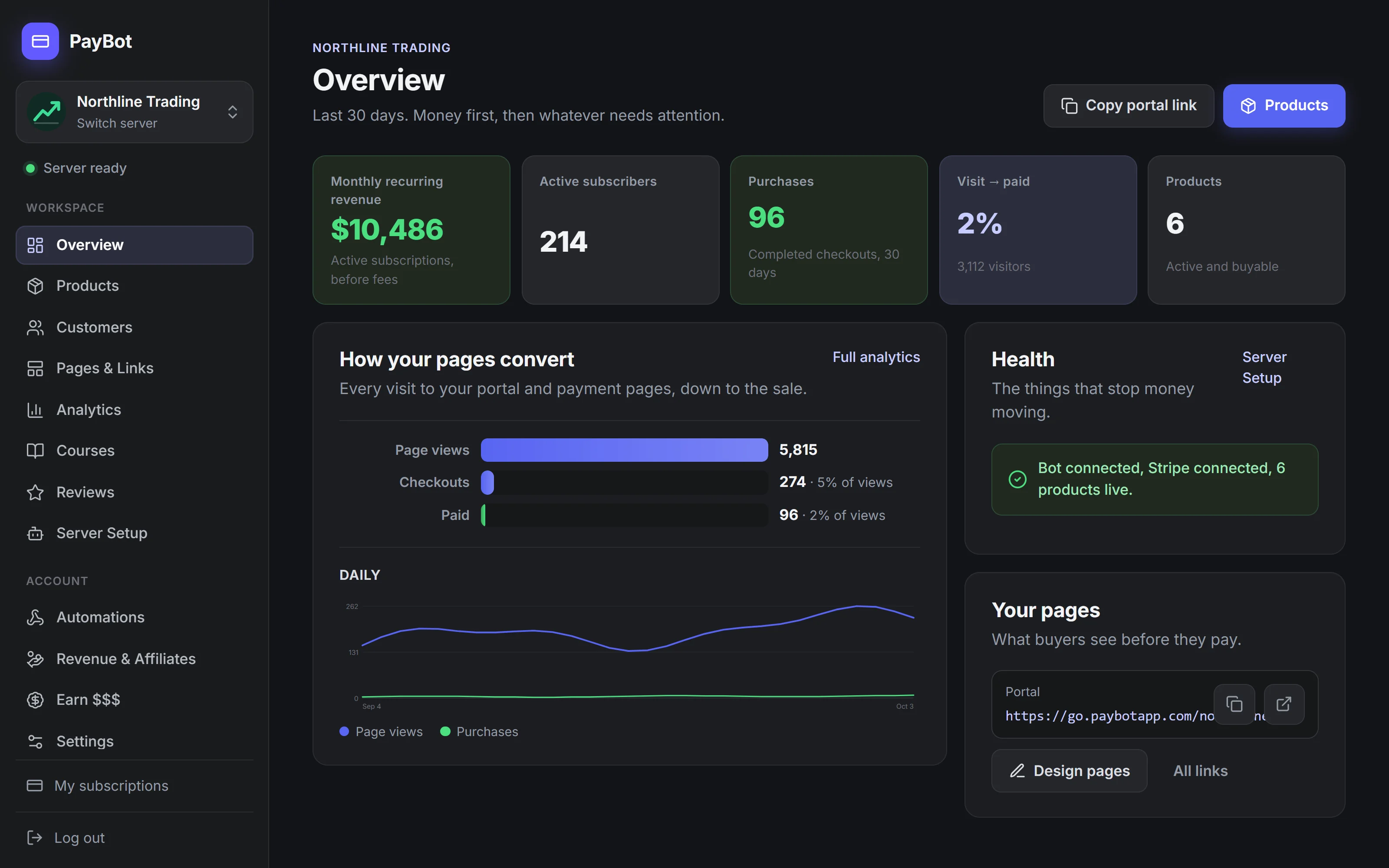
See revenue, active subscribers, and where buyers drop off in the PayBot dashboard. The full payment record stays in your Stripe.
How Your Members Subscribe
Members type /subscription in your Discord server, pick a tier from the dropdown, and pay through Stripe checkout. PayBot assigns their Discord role within seconds of payment confirmation.
They type /subscription
The bot shows available membership tiers with prices and benefits.
Pick a tier from the dropdown
Click "Proceed to Payment" and get taken to a Stripe checkout page.
Enter card info and pay
Standard Stripe checkout, on your own Stripe account.
Get their role instantly
PayBot assigns the Discord role within seconds of payment confirmation.
Simple Commands for Everything
Admin Commands
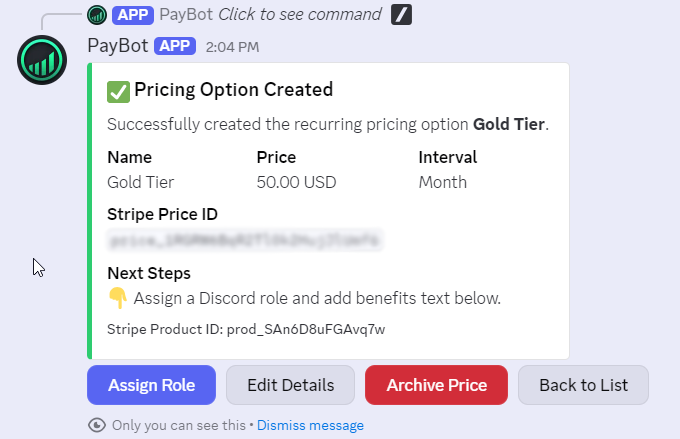
Requires Administrator/setupConnect Stripe, then manage products, payment links, and settings
/setup → Create SubscriptionCreate daily, weekly, monthly, quarterly, or yearly tiers
/setup → Create One-Time ProductSell lifetime or time-limited access for a single payment
/setup → View & Edit ProductsEdit, reprice, or archive existing products
Member Commands
All Members/subscriptionView available tiers and subscribe
/subscriptionWhen already subscribed: manage or cancel subscription
/subscription → UpgradeSwitch tiers in a product group, paying the difference now or at renewal, as you set it
/subscription → CancelEnd the subscription; access runs to the end of the paid period
💡 New: Share Payment Links Outside Discord
Accept payments from your website, social media, or anywhere, not just inside Discord. The bot still handles everything automatically.
Learn About Payment Links →What the Bot Does For You
PayBot automates membership tier creation, role assignment, subscription upgrades, failed payment handling, tier groups, and member notifications, from the web dashboard or simple Discord slash commands.
Membership Tier Creation
Set up unlimited membership levels with different prices and roles. Want Bronze, Silver, Gold tiers? Done. Need different pricing for students vs. professionals? Easy.
Automatic Role Assignment
Roles get added when someone pays and removed when their access ends. No manual work. Stripe tells PayBot the moment a payment clears, so the role follows within seconds.
Seamless Upgrades
Members can switch tiers mid-billing cycle. You choose per tier group whether they pay the prorated difference now or the new price starts at renewal.
Failed Payment Handling
If a card fails, Stripe retries and the member keeps access for a grace period you set (7 days by default). If the payment hasn't recovered by then, the bot removes their role.
Tier Groups
Link related tiers together (like Basic → Pro → Premium) to enable one-click upgrades and downgrades between them.
Member Notifications
The bot DMs members a welcome message when access starts. When a renewal payment fails, PayBot emails them, and DMs them too if later retries fail. They get an email when access ends.
Example Discord Server Setups
Trading Discord
Setup: Three tiers ($49/mo, $99/mo, $199/mo) for different signal channels.
What they did: Used tier groups so members can upgrade from Basic to Pro without canceling. Pro members get access to private voice channels for live trading calls.
Result: Members move up a tier without canceling first.
Fitness Coaching Server
Setup: Monthly ($9) and yearly ($90) subscriptions for the same program.
What they did: Gave the annual tier a different role color to make it feel premium. Added a "Yearly Member" badge in the nickname.
Result: Members pick the billing cycle that suits them, and yearly payments arrive upfront.
Course Community
Setup: One-time $199 payment for lifetime access to course channels.
What they did: Enabled one-time purchases. Students get a "Graduate" role after purchase.
Result: Simpler than monthly billing for a cohort-based program.
PayBot vs. LaunchPass vs. Whop vs. Patreon: Feature-by-Feature
| Feature | PayBot | LaunchPass | Whop | Patreon |
|---|---|---|---|---|
| Cost to take a payment | Free | $29/mo after a 14-day trial | Free to start | Free to start |
| Your own Stripe account | Yes | Yes | No | No |
| Where your money lands | Your own Stripe | Your own Stripe | Whop's balance | Paid out on Patreon's schedule |
| Courses | Built in | No | Separate app to add | No |
| Affiliates | Built in | No | Separate app to add | No |
Comparison based on publicly available information as of 2026. See full comparison · LaunchPass alternative · Subscord alternative
Bot Pricing
Free to install. Add the bot, connect Stripe, and start selling. You only pay us when your members pay you.
PayBot is free to start. Once your members are paying you, PayBot keeps a small 3% share of those sales. Stripe's own processing fees (usually 2.9% + 30¢ per transaction) apply separately.
Common Questions About the Payment Bot
Can the bot work with my existing Stripe account?
Yes. You connect your own Stripe account, so all your payment data, customer info, and payout schedule stay exactly the same.
What if I already have paying members outside Discord?
If they already pay through your own Stripe, Migrate Stripe Subscribers emails each one a claim link that ties their subscription to their Discord account. You can also grant anyone access by hand with gifted access.
Does the bot work in multiple servers?
Yes. You connect Stripe once per server, and the same Stripe account can serve several servers. Each product and its subscribers belong to one server.
Can I customize the bot's messages?
Yes. Write a custom welcome DM for each product, add a note above Stripe's Pay button, and set the title, text, and image of your promo posts.
What happens if someone's payment fails?
Stripe retries the charge, and the member keeps access for a grace period you choose (7 days by default, or none). PayBot DMs and emails them while it retries, alerts you, and removes the role if the payment hasn't recovered when the grace period ends.
Can members get refunds?
Yes. Issue the refund in Stripe or from Discord. A full refund removes their access automatically and the member gets a DM. A partial refund leaves access in place. If a buyer opens a dispute, PayBot alerts you so you can respond in Stripe.
Ready to Add Payments to Your Discord?
Free to add. Set up in under 5 minutes. You only pay when your members do.