
Discord Events Get One Notification. PayBot Reminds Members Until It Starts.
Discord's built-in events fire one notification at creation, then go silent. The /events command watches your scheduled events and re-announces them at every interval you set: 24 hours out, 1 hour out, the moment they start. Same Discord events. Way more attendance. No Stripe needed.
One pattern rule covers a whole recurring series. Works the moment you add the bot.
Why Discord Events Get Ignored
- You scheduled an event a week out and nobody saw it. The notification fired once and got buried.
- @everyone-ing before every event feels spammy, and you forget to do it half the time anyway
- Half your members think the event is tomorrow because they're in different time zones
- You host the same coaching call every Tuesday and the same six people forget every Tuesday
- You're doing the host's job AND the marketing team's job, and the event itself is the easy part
The /events command takes the marketing-team part off your plate. Set the intervals once; PayBot pattern-matches your event names and announces them every time, from now until you turn it off.
How /events Works
It plugs into Discord's native scheduled events. You tell PayBot which event names to watch and when to announce them. PayBot does the rest in the background.
Create your event in Discord like normal
Use Discord's built-in scheduled events (a coaching call, an AMA, a tournament). Give it a name pattern you'll reuse for the recurring version (e.g. "Coaching Call - May 8").
Run /events once, set the rules
Pick a name pattern (anything containing "Coaching"), pick an announcement channel, pick the intervals: 1 day, 2 hours, 1 hour, 30, 15, or 5 minutes before, at start, or any combination. One config covers every event that matches.
PayBot announces from then on
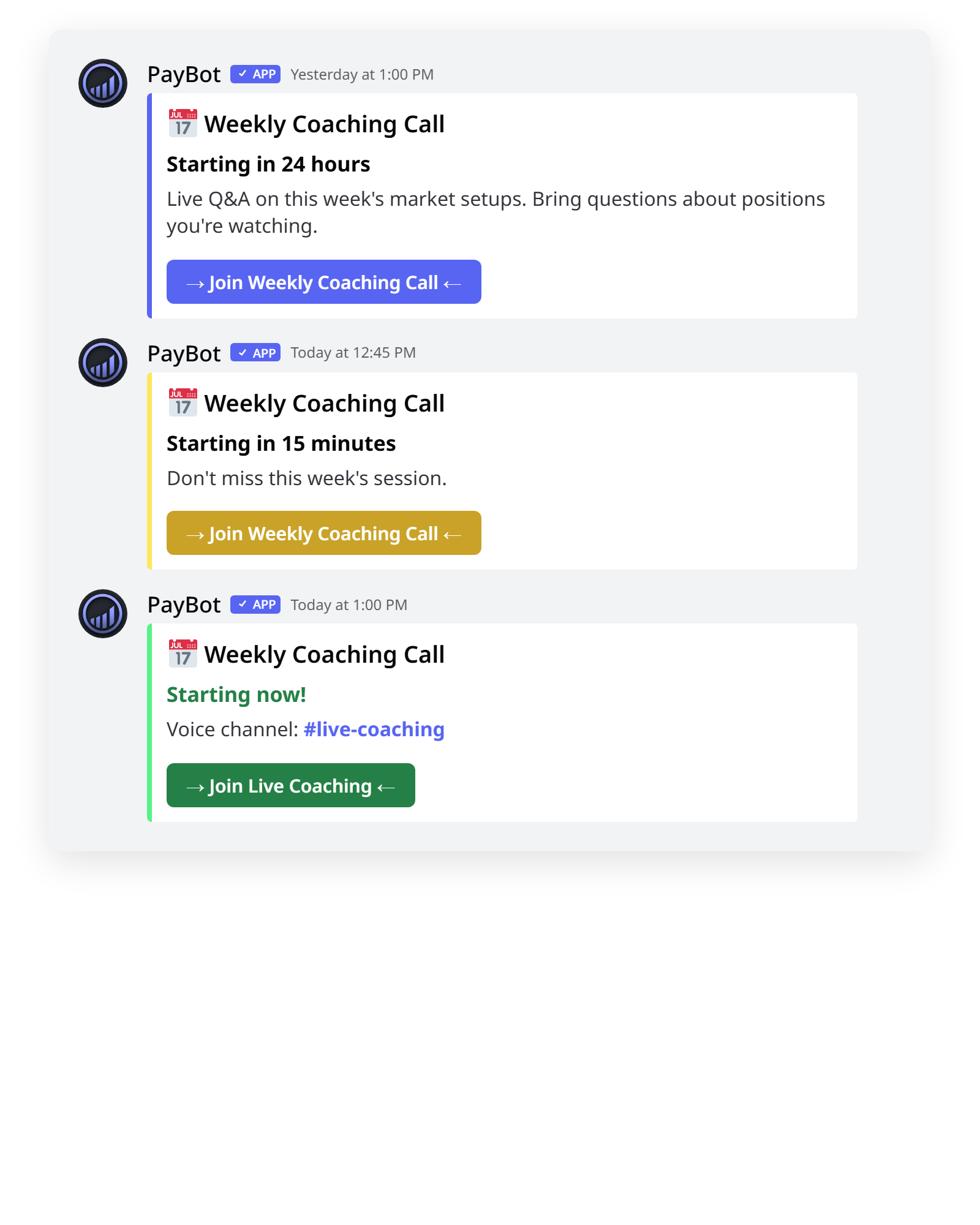
Reminders fire at every interval you picked, color-coded by urgency. Each one shows the title, description, and a one-click join link. At start time, PayBot drops the voice channel mention so members can hop straight in.
What Makes /events Different
Plugs Into Discord's Native Events
No separate calendar to maintain. Use Discord's built-in scheduled events feature exactly like you do today. PayBot listens and amplifies.
Reminders at Every Interval You Want
24 hours before. 1 hour before. 15 minutes before. The moment it starts. Pick any combination. Set different intervals per event type.
One Rule, Whole Recurring Series
Match by name pattern. "Coaching Call - May 8" and "Coaching Call - May 15" both fire under the same config. Configure once; never touch it again.
Color-Coded by Urgency
Far-out reminders are blurple. Within 15 minutes go gold. "Starting now" is bright green. Members scan the channel and instantly see what's hot.
One Click to Join
Every reminder includes the event link. At start time, PayBot also posts the voice channel mention so members hop straight into the room.
Free, No Stripe Needed
Run /events the moment you add the bot. No subscriber count, no upsell paywall.
Servers That Get the Most Out of It
Coaching & Course Communities
What's happening: A weekly coaching call every Tuesday at 2pm. The same six people forget every Tuesday.
What PayBot does: 24h ahead. 1h before. Members who'd otherwise forget show up. One pattern rule covers every Tuesday call going forward.
Trading & Live Signal Servers
What's happening: Pre-market briefings, live trading rooms, weekly recap calls. Trading windows are time-sensitive.
What PayBot does: 15-minute warning so members are ready when the call goes live. A green "Starting now" alert beats hoping people remembered.
Gaming & Hobby Servers
What's happening: Weekly raid nights, watch parties, tournament times. Casual servers where members drift if not pulled back.
What PayBot does: Day-before reminder, then 1-hour heads-up. Lurkers come back for the social moment instead of forgetting it existed.
Common Questions
Does this work with Discord's built-in events?
Yes, that's the whole point. You create events the normal way and PayBot announces them on the schedule you set. No extra calendar.
How does pattern-matching work?
You give PayBot a name pattern (case-insensitive). Any event whose name contains that text gets matched. So "Coaching" catches "Coaching Call - May 8" and every weekly recurrence after.
Can I have different reminder schedules for different event types?
Yes. Each pattern has its own announcement channel and intervals. Coaching calls can ping 24h+1h, while AMAs only ping at start.
Will it spam if I set lots of intervals?
No. Each interval fires once per event. PayBot tracks what's already been sent and won't re-announce.
What happens at the start of a voice event?
PayBot posts a green "Starting now" embed with a join link, plus a follow-up message tagging the voice channel so members can click straight in.
Does this require Stripe?
No. /events runs without connecting Stripe. Stripe is only needed for PayBot's paid-membership features.
Stop Hosting to Empty Rooms
Free forever. No Stripe. Set the intervals once and every event from here on out gets the reminders it deserves.