You share your Link in Bio everywhere - Twitter, YouTube, TikTok. But how do you know if it’s actually working?
Until now, you were flying blind. You could see Stripe revenue, but not what happened before checkout. Did people visit and leave? Click a tier but bounce at OAuth? Start checkout but abandon?
Now you can see everything.
The Full Funnel
PayBot now tracks every step from first visit to purchase:
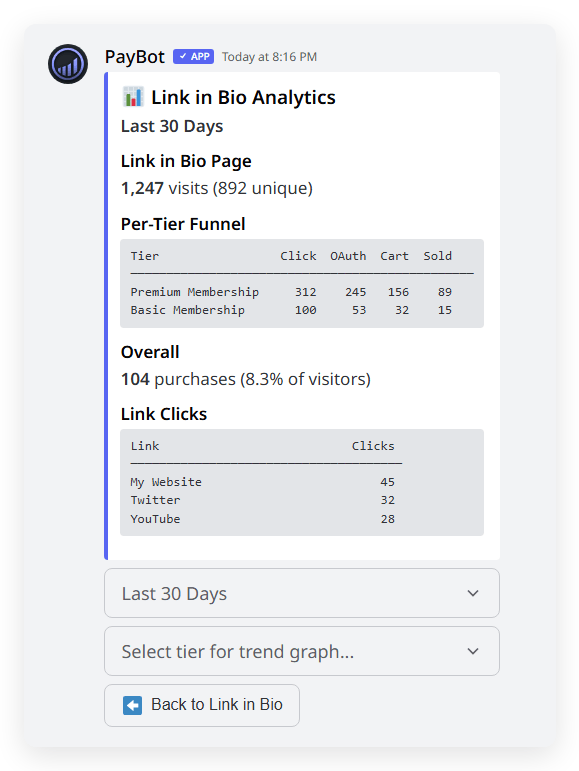
Page Views - How many people visited your Link in Bio page, and how many were unique visitors.
Tier Clicks - Which tiers are getting attention. See if your “Premium” tier gets more clicks than “Basic.”
OAuth - How many completed Discord authentication. If this drops off, people might be wary of connecting Discord.
Checkout Started - Who made it to Stripe checkout. High drop-off here might mean pricing friction.
Purchases - Actual conversions. The number that matters.
Per-Tier Breakdown
Don’t just see totals - see how each tier performs individually.
Maybe your $5/month tier gets lots of clicks but few conversions. Meanwhile your $20/month tier has a higher conversion rate. That tells you something about your audience.
The funnel table shows Click → OAuth → Cart → Sold for every tier, so you can compare side-by-side.
Link Click Tracking
Added social links or external URLs to your page? Now you can see how many people click each one.
See which links drive engagement. If your Twitter gets 50 clicks but YouTube only gets 5, you know where your audience wants to connect.
Time Range Flexibility
View your analytics for the last 7, 30, or 90 days. Check daily trends or zoom out for the bigger picture.
Short-term view shows campaign impact. Long-term view shows growth trends.
Trend Charts
Select any tier to see a line chart of its performance over time. Watch for:
- Traffic spikes after you share a link
- Conversion patterns on different days
- Drop-offs that signal problems
Smart Deduplication
Analytics count real visits, not inflated numbers. If someone refreshes the page or hits back, it doesn’t count again.
Each browser session counts once. Same person, new day? That’s a new session (which makes sense - they came back).
How to Access
- Run
/setupin your Discord server - Select Link in Bio Portal from the Settings menu
- Click the Analytics button
That’s it. Your funnel data appears immediately.
What This Means For You
Stop guessing what’s working. Now you can:
- Identify drop-off points - If lots of people click but few buy, you know where to focus
- Compare tier performance - See which products resonate with your audience
- Track marketing impact - Share a link on Twitter, check analytics the next day
- Optimize your page - Rearrange content based on what actually gets clicks
Already Available
If you have a Link in Bio page, you already have analytics. The tracking started automatically - check your data now.
No setup required. No extra cost. Just open /setup → Link in Bio Portal → Analytics.
Questions? Join our support server or hit us up on Twitter.
New to PayBot? See the full feature overview.